Loot Log
Logs all loot your party gets, also from auto-loot mods, in a filterable in-game window with an optional pop-up and chime.
What it does
- Logs every item that joins the party: the inventories of the party members, the bags inside them, and the camp chest.
- Works with auto-loot mods, because it listens to the game's inventory events instead of the loot window.
- An in-game window lists the log, with filters for item type, rarity, value and a text search.
- Shows where each item is now: which party member, which bag, the camp chest, or sold and gone. Items that sorting mods move into bags are easy to find again.
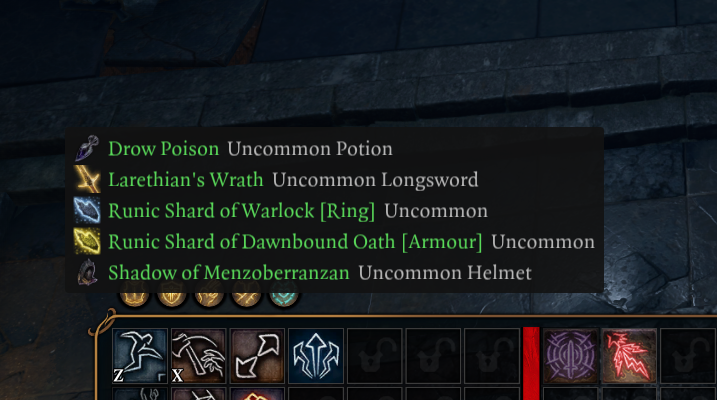
- A pop-up and a chime tell you about new loot of the rarity you choose (Uncommon and better by default).
- Each savegame keeps its own log (the newest 500 entries).
Screenshots

How to install
- Install Norbyte's Script Extender. It updates itself.
- Download
bg3_lootlog.pakfrom the latest release on GitHub. - Copy it to
%LOCALAPPDATA%\Larian Studios\Baldur's Gate 3\Mods. - Enable Loot Log in your mod manager (BG3 Mod Manager or the in-game mod manager).
To update the mod, replace the .pak with the one from the new release. To remove it, disable it in the mod manager
and delete the .pak. Saves made with the mod can then show a warning about a missing mod.
How to use
Press F7 to show or hide the window. You can change the key and add a modifier (Ctrl, Shift, Alt) under Options.
- Filters: item types (12 checkboxes), minimum rarity, minimum value (gold), and a search over the item name, type, owner (Who), current place (Where) and source (From). A search for a bag name lists everything in that bag. The section folds; its header says Filters (active) when a filter hides entries.
- Quick buttons: Gear only (weapons, armor, jewelry), Hide food & junk, All types.
- Use filters (the checkbox right above the table): turn it off to see the full log with one click. Your filter settings stay as they are. The status line then reads Filters off, and the section header Filters (off).
- Options: toggle key, modifier, rows shown, item icons, and Clear log.
- Pop-up and chime: new loot of at least the chosen rarity shows a notice for 6 seconds (name and subtext, newest first, at most 5 lines) and plays a chime. The notice does not catch mouse clicks. Options: Pop-up for new loot, Pop-up and chime from (rarity, default Uncommon+), Pop-up left/right % and Pop-up up/down % (default 50 / 14, top center; moving a slider shows a sample), Chime volume (0 = off; releasing the slider plays a preview), Chime sound (Item received, Recipe unlocked, Success roll, Inspiration, Coins, Journal updated, Quest completed, Dice success) and Test pop-up and chime.
Every item shows a subtext like the game's tooltip, for example Uncommon Cloak, Rare Longsword, Common Light Armour, Common Potion. The search also finds the type ("cloak", "ring").
The Where column shows where the item is now:
- Karlach, Karlach > Pouch > Gem Bag (bags inside bags), Karlach (equipped), Camp chest > Box
- in gray: another inventory (a trader after you sold the item, or a chest in the world), On the ground, or Gone (sold, used up or destroyed; this is final)
- a potion, arrow or gold stack that merged into another stack shows the place of that stack
While the window is open, the places are checked every 2 seconds.
Columns
| Column | Meaning |
|---|---|
| Age | Time since the item arrived (real time) |
| Item | Item name, colored by rarity, followed by the subtext (rarity and item type) |
| Type | Weapons, Armor, Jewelry, Clothing, Potions, Scrolls, Ammo, Food, Gold, Keys, Quest, Other |
| Rarity | Common, Uncommon, Rare, Very Rare, Legendary, Unique |
| Qty | Stack size |
| Value | Value of one item, in gold |
| Who | Party member (or Camp chest) that received the item |
| Where | Where the item is now |
| From | Container, corpse or trader the item came from; empty for items picked up from the ground |
Console commands (Script Extender console)
| Command | Effect |
|---|---|
!lootlog |
Show or hide the window |
!lootlog_test |
Add one sample entry per item type (to check the window without looting) |
!lootlog_debug |
Print every relevant inventory event to the console (on/off) |
!lootlog_rescan |
Mark everything the party owns as known again |
The filter, window, pop-up and chime settings are saved in
%LOCALAPPDATA%\Larian Studios\Baldur's Gate 3\Script Extender\bg3_lootlog\settings.json. The log itself is saved in
the savegame.
Compatibility
- Game version: Patch 8
- The load order does not matter. The mod changes no game data; it only reads the game's inventory events.
- Ancient Mega Pack auto loot works: it moves loot without notifications, and Loot Log still logs it. Corpse and chest loot shows the corpse or chest in From; ground pickups have no source; picked-up containers are listed with their contents; send to camp changes the owner to Camp chest.
- Loot Autoseller (FallenStar) works: junk is sold the moment it arrives. It still appears in the log as Other, followed by a small Gold entry. Hide food & junk and the Gold checkbox hide both.
- No known conflicts.
Known issues
- Splitting a stack creates a new item. A split stack (also gold) that moves to another party member can appear as new loot.
- Dropping an item and picking it up again logs it again, because the game creates a new item on pickup.
- Items the party owned before the mod was installed are never logged.
- While the chime plays, other UI sounds are quieter too: the chime volume scales the game's UI volume for a moment.
If the window does not open, look for errors in the Script Extender console. To turn the console on, create
ScriptExtenderSettings.json in the game's bin folder:
{
  "CreateConsole": true,
  "LogRuntime": true
}
After each load, the console shows a line like
[LootLog] Loot Log 1.0.0.0. Session loaded: 4 party members, 812 items marked as known, 37 log entries. Logging is active.
How to build
Anyone can build this mod from its source code and check that the download matches it.
- Install the tools: Windows PowerShell 5.1 (part of Windows) and LSLib
v1.20.4. Put LSLib into a folder
_tools\lslib\above the repository, or setBG3_TOOLSto the folder that holdslslib\. - Build it:
powershell -ExecutionPolicy Bypass -File .\build.ps1 - Find the file:
dist\bg3_lootlog.pak
The offline tests need Python 3 with lupa: python -m pip install lupa, then python tests\run_tests.py.
Credits
Made by Kintaro. MIT license: you may use, change and share this mod.