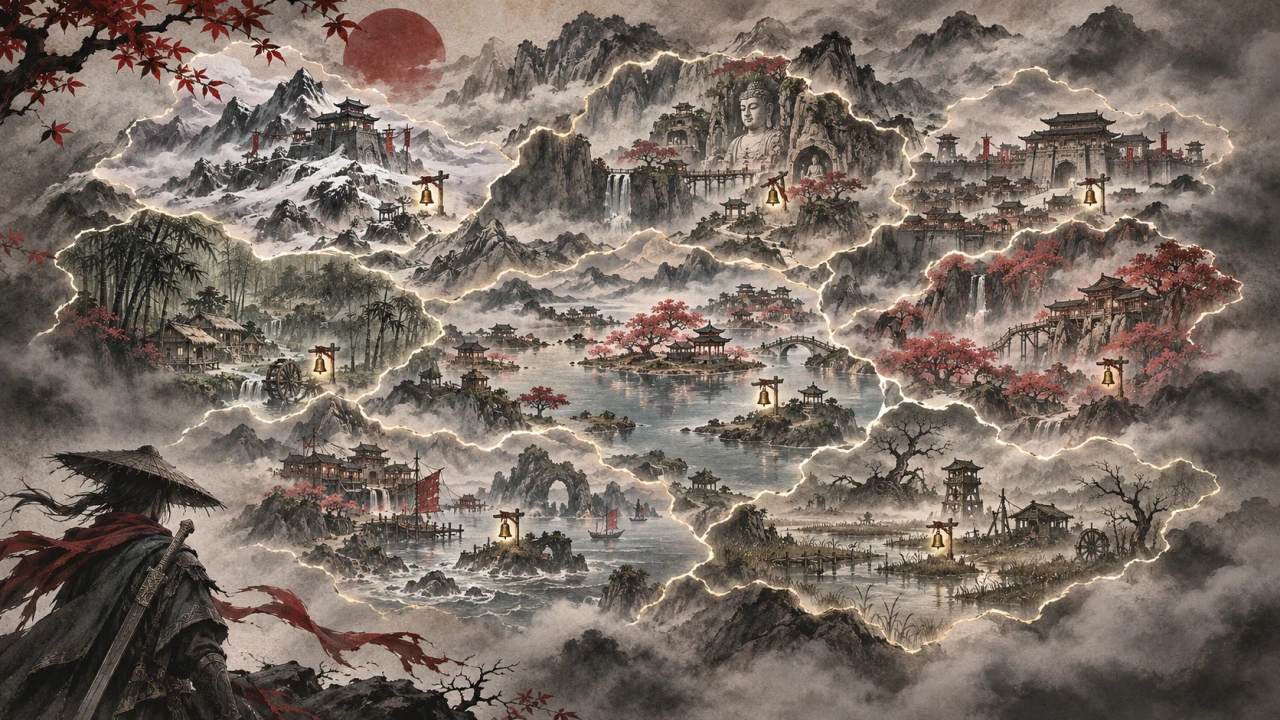
World Map Outlines
The world map outlines every region you have discovered, all the time. No image files, no game file replaced. A PBZModLoader mod.
What it does
The world map shows a soft outline around every region you have discovered, all the time, without moving the cursor over each one.
- A region counts as discovered by the map's own rule: you have rung one of its bells.
- The outlines follow the map when you pan and zoom, sit below the game's fog and markers, and never block the cursor.
- Eight regions: Xigu, Fuji Forest (fujizhilin), Lu Village (lujiacun), the Righteous Union Camp (zhengdaodaying), Dengding Island (dengdingshandao), Duanhun Cliff (duanhunya), Meigu Lake (meiguhu) and Pangzhen.
It is a PBZModLoader mod: a script in the game's own script engine. The outlines are inside the script: no image files, no game file replaced, nothing written into the save.
Screenshots


How to install
- Install PBZModLoader 2.1.0 or later.
- Download the zip of the latest release on GitHub (
phantombladezero_worldmapoutlines_<version>.zip). - Unpack it into the game folder (the folder that holds
ProjectPBZ). It adds the folderProjectPBZ\PBZModLoader\mods\phantombladezero_worldmapoutlines\withmain.jsand the settings file. - Start the game.
To check that it runs: ProjectPBZ\PBZModLoader\loader.log has the line
[PBZMOD] [World Map Outlines] <version> started; settings: ....
To update the mod, replace main.js with the one of the new release; keep your settings file (a setting that it does
not have keeps its default). To remove the mod, delete the folder ProjectPBZ\PBZModLoader\mods\phantombladezero_worldmapoutlines\.
How to use
Nothing to do: open the world map.
Settings
The settings are in ProjectPBZ\PBZModLoader\mods\phantombladezero_worldmapoutlines\phantombladezero_worldmapoutlines.txt. Open it with a text editor,
change a value and save: the open world map takes it within 2 seconds, without a restart. Without the
file the mod writes it with the defaults below. Keys are not case-sensitive; ; or # starts a comment.
With Mods Menu (0.9.0 or later) in the game, the mod adds its page to Mods Menu's tab in the game's settings, and
the page's settings are the ones that count: Mods Menu keeps them in its own file in the game's Saved folder, and
the file in the mod's folder is not read then.
| Setting | Default | What it does |
|---|---|---|
Enable |
On |
Off: the game's own world map |
Opacity |
1 |
How strong the outlines show, 0.1 to 1 (1 = as drawn) |
Compatibility
- Game version: Steam build 26367565 (
CL-302256_JKS-17280). - Needs PBZModLoader 2.1.0 or later. Mods Menu is optional.
- The earlier "TracedLands" (UE4SS with loose images, or a pak): remove it first, or the outlines show twice.
- Mods that change the map script: this mod replaces no script; it wraps the map's own method, so it works next to
mods that do the same, and next to a pak that replaces
Map.js(it then wraps that one).
Known issues
- None known.
How to build
There is nothing to build: src\phantombladezero_worldmapoutlines\ is the mod folder (main.js and the settings file).
tests\test_mod.js runs the script outside the game with Node.js and stand-ins for the game: node tests\test_mod.js.
README.md has the details.
Credits
Made by Kintaro. MIT license: you may use, change and share this mod. PBZModLoader is made by LKF, its fork by KintaroModding. Phantom Blade Zero and its files belong to their makers.