PBZMoConfig
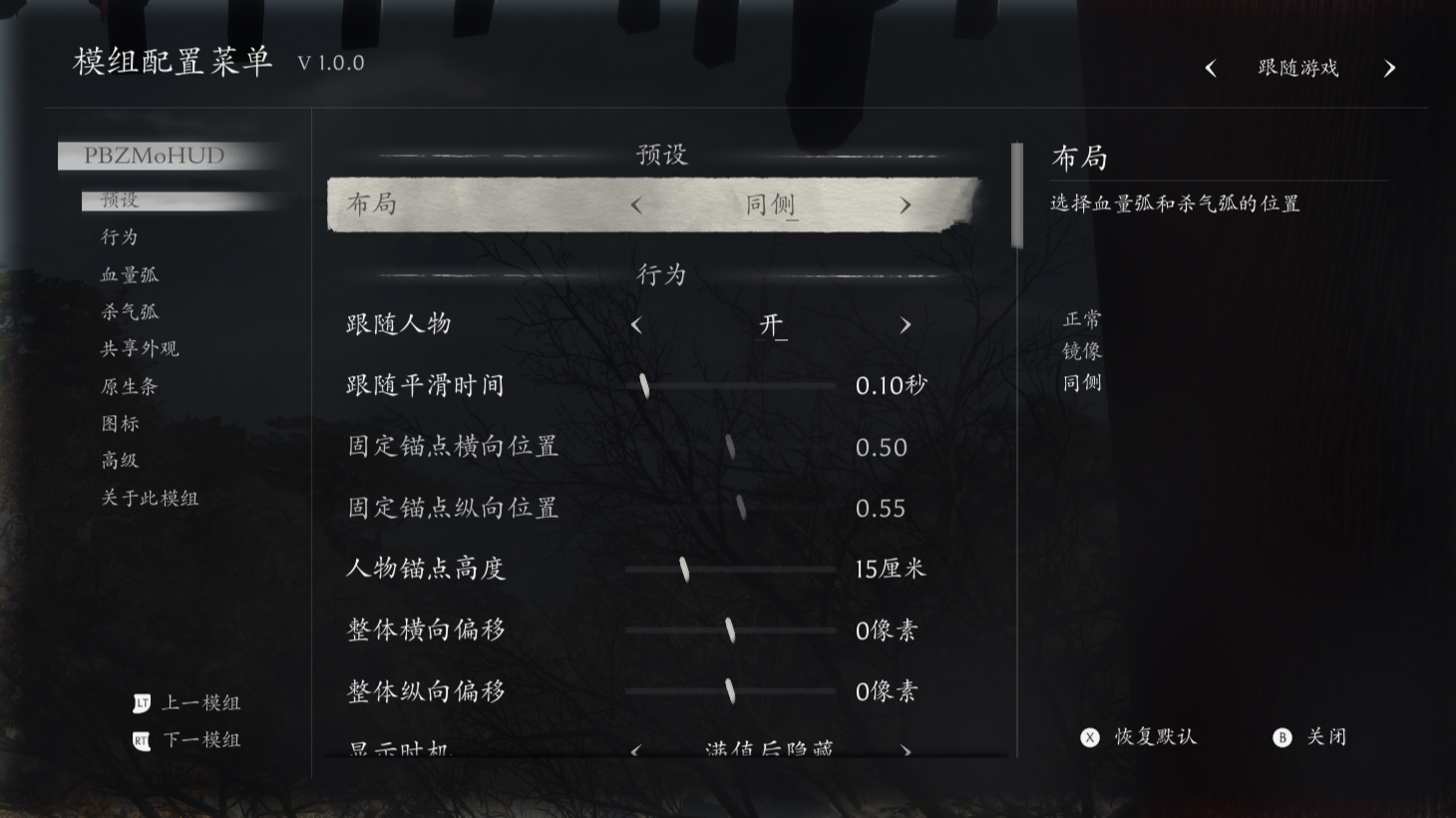
A shared in-game settings menu for Phantom Blade Zero mods. It is a front end only: it draws the panel and reads and writes each mod's own Scripts/settings.ini. It does not read game values, draw a HUD, or modify game data.
What it does
- A mod registers one pure-data
schema.luaand gets a settings page in the shared menu; it ships no UI code of its own. - Edited values are a live preview. Nothing is written until the player applies them, so the menu can be closed and the changes discarded without touching any file.
- Each mod keeps its own ini. Switching mods or closing with unsaved changes asks whether to save or discard.
- The interface follows the game language by default (
auto) and can be pinned to any of the 15 languages the game offers. Missing translations fall back to English. - All Lua: no DLL, web page, external process or binary module. Without UE4SS ModRef shared variables it still works from
registry.ini, but without live preview, selection notices and save events.
Mod authors will find the schema format, the shared-variable protocol and the event / save APIs in README.md and README-EN.md.
Screenshots

How to install
- Install UE4SS 3.x for Phantom Blade Zero, with ModRef shared variables available.
- Get the mod files: download the archive from the latest GitHub release, or, while no release is published, copy the
PBZMoConfigfolder from this repository. - Put the folder at
<game>/platform/steam/ue4ss/Mods/PBZMoConfig.enabled.txtandScripts/main.luamust sit directly inside it.mods.txtneeds no edit. - Start the game and load into a playable state. The first log line should read
=== PBZMoConfig v… loaded OK (Scripts/main.lua) ===, followed byshared bus ready.
To update, replace the folder with the newer files but keep Scripts/settings.ini (key binds, language choice, debug switch). To remove, delete the folder. Neither operation changes save games.
How to use
The panel starts hidden. Press HOME to show it; on a gamepad, hold Special_Left for 0.1 s and tap Special_Right.
| Input | Action |
|---|---|
HOME |
Show / hide the panel |
↑ / ↓, Enter |
Move between rows; toggle a switch, open a choice, start key capture |
← / → |
Change a value or step to the next preset colour |
T |
Apply the current mod's draft to its own ini |
R |
Restore that mod's defaults (still only a draft) |
Esc |
Close; asks to save or discard when a draft exists |
PageUp / PageDown, mouse wheel |
Scroll the settings list |
| Mouse | Click arrows, swatches and choices; drag sliders and the colour field; middle click resets one row |
| Gamepad | D-pad / left stick to move and change values; A / B / X / Y to confirm, close, reset and apply; LB / RB change group; LT / RT change mod |
Values edited in the panel are drafts and are shown live. Only T, or the save choice in the confirmation dialog, writes them to that mod's ini; a global save on closing the panel writes all mods. The framework's own key binds, language option and debug switch are in Scripts/settings.ini ([keys], [pad], [ui] lang, [log] debug).
Compatibility
- Requires UE4SS 3.x with ModRef shared variables for live preview, selection notices and save events.
- Works with any mod that registers a schema;
PBZMoHUDis one. When shared variables are unavailable, registration falls back toregistry.iniand the panel still reads and writes ini files. - Reads no game stats and changes no game data. The only files it writes are the settings ini files it was given and its own language choice.
Known issues
The panel is laid out left to right; right-to-left scripts are not supported. Language-specific font faces come from the game's own UI assets, so glyph coverage depends on the game build.
How to build
Nothing to build: the release contains the files of this repository.
The mod is plain Lua loaded by UE4SS; there is no compiler, bundler or generated artifact. install_to_game.py is a local helper that copies files into a game installation (dry-run by default); it is not a build step. Repository checks for contributors: python tests/run_tests.py with Python 3 (the full Lua suite needs lupa; --static-only runs without it).
Credits
By Moirstral. AGPL-3.0, see LICENSE. Interface translations live in lang/; the font faces come from the game's own UI assets.