PBZMoHUD
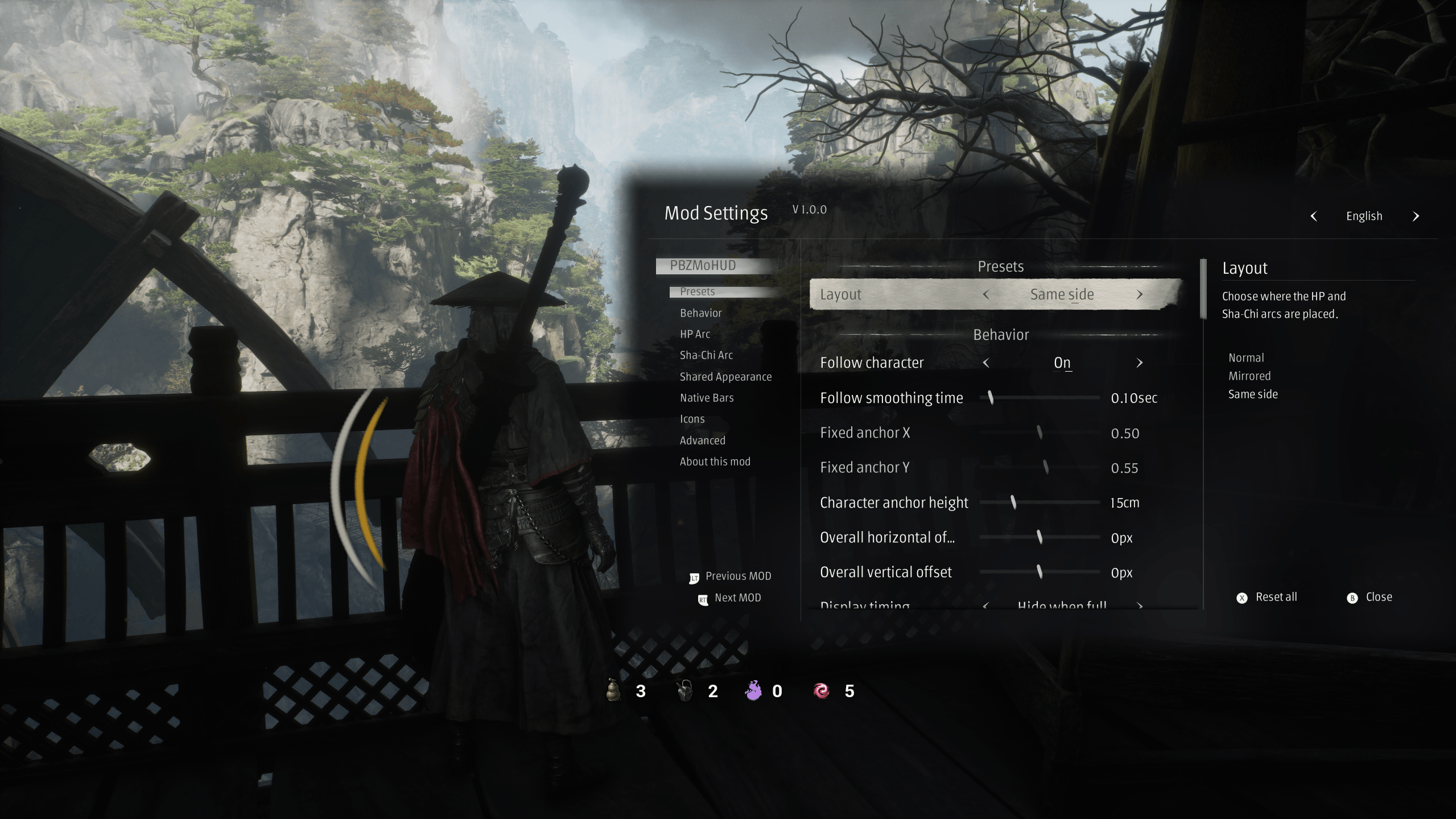
Individually adjustable HP and Sha-Chi arcs for Phantom Blade Zero, with potion, Sha-Chi Essence and Dark Source icons. Reads player values without changing game data.
What it does
- Replaces the flat health and Qi readouts with two independent arcs; radius, span, rotation, thickness, fill direction, offsets, colours, ghost trail and brush tip are set per arc.
- Adds medicine, pure-Qi and dark-source icons with adjustable anchors; icon groups can be dragged on screen.
- Optionally pins the game's native bars to a fixed length and shows current / maximum values on them.
- Shows a break-state colour on the Qi arc while the character is staggered.
- Settings live in
Scripts/settings.ini. With PBZMoConfig they are edited in the shared in-game panel with live preview; without it the ini can be edited by hand and the HUD still runs.
Screenshots

How to install
- Install UE4SS for Phantom Blade Zero. For the in-game settings panel, live preview and icon dragging, also install PBZMoConfig with event and deferred-save support.
- Get the mod files: download the archive from the latest GitHub release, or copy the
PBZMoHUDfolder from this repository. - Close the game, then put the folder at
<game>/platform/steam/ue4ss/Mods/PBZMoHUD, keepingScripts/,lang/andenabled.txt. - Start the game. If
Scripts/settings.iniis missing the HUD uses defaults; it never creates or rewrites that file on startup.
To update, replace the code and lang/ files and keep Scripts/settings.ini and enabled.txt. To remove, delete the folder. No save data is changed. install_to_game.py is a local helper for this copy (dry-run by default, --apply --sync to write); it preserves an existing ini and never touches other mods.
How to use
With PBZMoConfig: press HOME, select PBZMoHUD in the left list, edit values to preview them, then press T to write the current mod's draft. R restores defaults; Esc closes and asks about unsaved changes. Discarding a draft rolls the HUD back.
To move icons, run Drag icons on the settings page. The panel folds away; left-drag a group, right-drag a single icon, middle-click to reset a group to its automatic anchor. Esc returns to the panel, and the new positions are written only when the changes are applied.
Without PBZMoConfig, edit Scripts/settings.ini directly (Key = value, booleans true / false, colours #RRGGBB, comments on their own ; lines). The full key list is in README.md.
Compatibility
- Requires UE4SS 3.x. PBZMoConfig is optional for the HUD itself and required for the settings panel, live preview, save requests and icon dragging.
- Do not enable
PBZPlayerArcsat the same time: both draw the same HUD. Settings from that older mod are not migrated. - Read-only towards the game: no character stats, combat state or save data are modified. The native bar pin only writes to the game's own bar widgets.
- The settings text follows the language selected in PBZMoConfig; missing translations fall back to English.
How to build
Nothing to build: the release contains the files of this repository.
The mod is plain Lua loaded by UE4SS; there is no compiler, bundler or generated artifact. install_to_game.py copies runtime files into a game installation (dry-run by default); it is not a build step.
Credits
Refactored from PBZPlayerArcs v0.4.0, kept in a separate repository. By Moirstral. AGPL-3.0, see LICENSE.